JS/TS
从零开始
JS/TS 是当前前端开发中主要的编程语言之一。说它是最主要的前端编程语言,应该没有争议。本文由浅入深、实用优先、浅而重、深而用、有所述、有所不述的系统的介绍 JS/TS。
开始写代码之前
-
代码编辑器
VS Code ,不管是前端开发还是后端开发,是当前最流行、最方便使用的代码编辑器,没有之一。需要说明的是作为专业的程序开发人员,熟练使用 Vim 仍然是必须的。VS Code 的第三方插件非常丰富,本文不做 VS Code 使用的说明,仅列出 VS Code 的三个常用功能(插件)供第一步使用:
- 集成命令行终端(Terminal),可以在集成窗口内直接运行本地和远程程序和命令;
- 集成远程连接(SSH),可以直接连接远程 Linux 服务器,不仅是命令行连接,是“整个 VS Code 连接远程服务器”(目录窗口显示远程服务器目录,编辑窗口直接显示远程代码文件,终端窗口显示远程命令行);
- 集成 Git,不再需要使用 TortoiseGit、Git Bash 等第三方 Git 工具;
-
Node.js
一个基于 Chrome V8 引擎 的 JavaScript 运行时环境,它的主要作用是让开发者能够使用 JavaScript 在服务器端构建快速、可扩展的网络应用
不管你是否看懂了这句话,只管按照官方 Get Started 的说明,安装即可。
-
TypeScript Compiler
Node.js 只能运行 JS 代码,TS 代码需要使用 TypeScript Compiler “翻译”为 JS 代码,因此,需要安装 TypeScript Compiler,本文不详细介绍工具的安装和使用。
开始写 JS/TS 代码
| /**
* This TypeScript code demonstrates:
* - the use of various console methods,
* - variable and constant declarations,
* - primitive data types,
* - and control flow structures.
*/
// 1. Console Methods:
console.log("\n0. Demonstrating Various Console Methods:\n");
console.info("1. This is an info message.");
console.warn("2. This is a warning message.");
console.error("3. This is an error message.");
console.debug("4. Debugging information here.");
// 2. Variables and Constants:
// 2.1 Using const to define constants (values that cannot be changed).
const userName: string = "Tony Stark";
const maxScore: number = 100;
// 2.2 Using let to define variables (values that can be changed).
let currentScore: number = 85;
let isPassing: boolean = false;
// Union type: message can be either a string or null
let message: string | null = null;
/**
* 3. Primitive Data Types:
* - number,
* - string,
* - boolean,
* - undefined,
* - null
*/
console.log(`\nWelcome, ${userName}!`);
console.log('Welcome,', userName + '.');
console.log(`Your starting score is: ${currentScore} (Max score: ${maxScore})`);
const bonusPoints: number = 5;
currentScore = currentScore + bonusPoints;
console.log(`Congratulations on earning ${bonusPoints} bonus points! Your current score is now: ${currentScore}`);
// 4. Control Flow: if/else structure
if (currentScore === maxScore) {
isPassing = true;
message = "Excellent! You achieved a perfect score.";
} else if (currentScore >= 90 && currentScore < maxScore) {
isPassing = true;
message = "Well done! You passed, but there's room for improvement.";
} else {
isPassing = false;
message = "Unfortunately, the score did not meet the standard. Please try harder.";
}
console.log(`Is passing?: ${isPassing}`);
console.log(`Message: ${message}`);
// 5. Demonstrate undefined and null
let extraInfo: string | undefined;
console.log(`\nType of extraInfo: ${typeof(extraInfo)}`);
/**
* Demonstrating the use of undefined in TypeScript.
* Suppose under certain conditions extraInfo is not assigned,
* it defaults to undefined
*/
console.log(`\nAdditional undefined information (default undefined): ${extraInfo}`);
// 6. Control Flow: for loop
console.log("\nSimulating Eight Attempts to Improve Score:");
for (let attempt = 1; attempt <= 8; attempt++) {
currentScore++;
console.log(`Attempt ${attempt} ended, current score: ${currentScore}`);
// Suppose when the score reaches 98, set extraInfo
if (currentScore === 98) {
extraInfo = "Status is good, close to perfect!";
}
}
console.log(`\nValue of extraInfo after the loop ends: ${extraInfo}`);
// At the end, set message to null to indicate clearing
message = null;
console.log(`\nType of message: ${typeof(message)}`);
console.log(`Program ended, message variable reset to: ${message}`);
|
如上所述,Node.js 不能运行 .ts 文件。需要先将 .ts 文件“翻译”为 .js 文件,再执行 .js 文件:
| PS D:\ts_learning\ts_basic> ls
目录: D:\ts_learning\ts_basic
Mode LastWriteTime Length Name
---- ------------- ------ ----
-a---- 2025-11-17 18:19 316 index.html
-a---- 2025-11-17 21:29 2875 ts_basic.ts
PS D:\ts_learning\ts_basic> tsc .\ts_basic.ts
PS D:\ts_learning\ts_basic> ls
目录: D:\ts_learning\ts_basic
Mode LastWriteTime Length Name
---- ------------- ------ ----
-a---- 2025-11-17 18:19 316 index.html
-a---- 2025-11-17 23:39 2875 ts_basic.js
-a---- 2025-11-17 21:29 2875 ts_basic.ts
PS D:\ts_learning\ts_basic>
|
开始,ts_learning\ts_basic> 文件夹下只有两个文件,一个 .html 文件,一个 .ts 文件,执行:
| PS D:\ts_learning\ts_basic> tsc .\ts_basic.ts
|
后,文件夹下生成了一个 .js 文件。这个 .js 文件是 Node.js 环境的可执行文件,执行 .js 文件:
| PS D:\ts_learning\ts_basic> node.exe .\ts_basic.js
|
程序输出:
| 0. Demonstrating Various Console Methods:
1. This is an info message.
2. This is a warning message.
3. This is an error message.
4. Debugging information here.
Welcome, Tony Stark!
Welcome, Tony Stark.
Your starting score is: 85 (Max score: 100)
Congratulations on earning 5 bonus points! Your current score is now: 90
Is passing?: true
Message: Well done! You passed, but there's room for improvement.
Type of extraInfo: undefined
Additional undefined information (default undefined): undefined
Simulating Eight Attempts to Improve Score:
Attempt 1 ended, current score: 91
Attempt 2 ended, current score: 92
Attempt 3 ended, current score: 93
Attempt 4 ended, current score: 94
Attempt 5 ended, current score: 95
Attempt 6 ended, current score: 96
Attempt 7 ended, current score: 97
Attempt 8 ended, current score: 98
Value of extraInfo after the loop ends: Status is good, close to perfect!
Type of message: object
Program ended, message variable reset to: null
|
程序重点解读
-
常量与变量
- 常量(const 关键字定义),值不会改变,例如:
| const userName: string = "Tony Stark";
const maxScore: number = 100;
|
| let currentScore: number = 85;
let isPassing: boolean = false;
|
-
联合体类型(Union type)
| let message: string | null = null;
|
变量 message 可以是 string 类型,也可以是 null(默认值)。
-
五种原始数据类型(Primitive Data Types)
- number
- string
- boolean
- undefined
- null
-
常量和变量的引用
| console.log(`\nWelcome, ${userName}!`);
console.log('Welcome,', userName + '.');
console.log(`Your starting score is: ${currentScore} (Max score: ${maxScore})`);
|
-
比较运算符 (===)
=== 和 == 的区别在于它们在比较两个值时,是否允许进行类型转换(Type Coercion)-
=== 执行严格比较,它的规则非常清晰:
- 先比较类型: 如果两个值的类型(Type)不同,直接返回
false。
- 再比较值: 如果类型相同,则比较它们的值
-
== 执行宽松比较,它的规则非常复杂和不直观:
- 先比较类型: 如果两个值的类型不同,JavaScript 会尝试进行类型转换,将一个或两个操作数转换为另一个类型,直到它们的类型相同,然后再比较值。
- 再比较值: 如果类型相同,行为与
=== 一致
Note
- 强烈推荐只使用
===,不再使用 ==;
- TS 在 strict 模式下(默认),
== 不能编译通过;
-
undefined 和 null
undefined 和 null 是 JS/TS 中两个特殊的原始类型(Primitive Types),undefined,值尚未被赋值(系统或变量默认状态),typeof 结果 'undefined';参考上述代码和执行结果。
| 特性 |
undefined |
null |
| 含义 |
值尚未被赋值(默认状态) |
明确地、有意识地被赋值为“空”(表示一个对象或值的持有者,但它现在不持有任何东西) |
| 来源 |
通常由JavaScript运行时(就是运行环境)自动设置 |
必须由程序员显式设置 |
| typeof |
'undefined' |
'object' (这是 JS 的一个历史遗留 bug),但实际上 null 是一个原始类型 |
JS 文件的执行
JS 文件的两种执行方法:
console 方法
console.log()console.info()console.warn()console.error()console.debug()
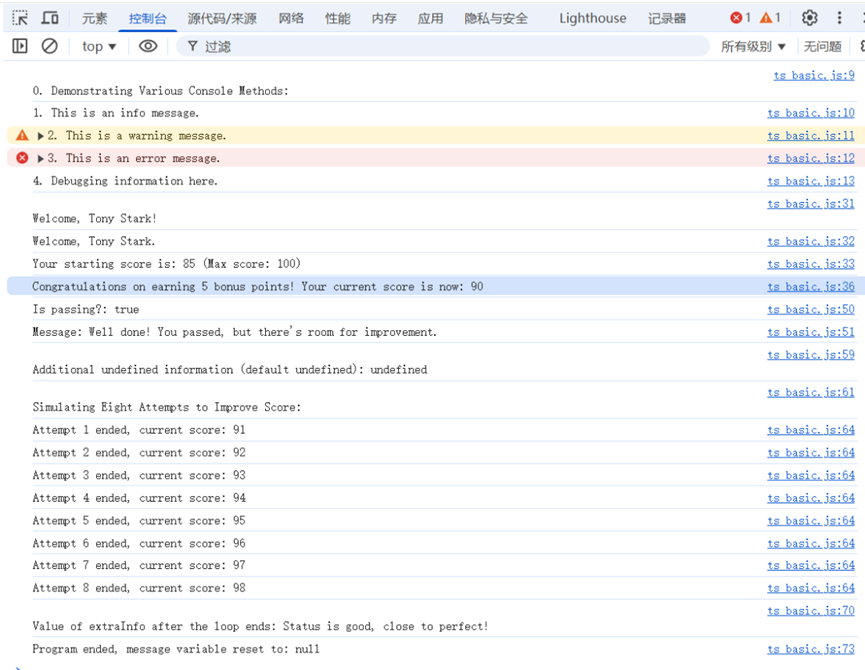
请注意不同的 console 方法在浏览器中执行的输出
| console.log("\n0. Demonstrating Various Console Methods:\n");
console.info("1. This is an info message.");
console.warn("2. This is a warning message.");
console.error("3. This is an error message.");
console.debug("4. Debugging information here.");
|
可以发现,浏览器特殊处理了 console.warn() 和 console.error()。
可变更新与不可变更新
什么是可变更新和不可变更新?
React和Redux官网关于可变更新和不可变更新的主要说明
可变更新(Mutable Update) && 不可变更新(Immutable Update) 是现代前端编程的核心技术之一,其重要性如下所示:
Although objects in React state are technically mutable, you should treat them as if they were immutable — like numbers, booleans, and strings. Instead of mutating them, you should always replace them.
Treat all state in React as immutable
You must treat React elements and their props as immutable and never change their contents after creation. In development, React will freeze the returned element and its props property shallowly to enforce this.
Props and state are immutable
Don’t mutate Props
Don’t mutate State
Return values and arguments to Hooks are immutable
Values are immutable after being passed to JSX
Whenever your object would be mutated, don’t do it. Instead, create a changed copy of it.
Why is immutability required by Redux?
Note
从上面的引用可以看出可变更新(Mutable Update)和不可变更新(Immutable Update)是React、Redux等现代前端编程的重要技术。
示例代码
可变更新和不可变更新在现代前端状态管理(如 React 和 Redux)中得到了最广泛的应用和普及,为了比较好的解释,新先贴上代码:
| /**
* Immutable vs Mutable State Updates and Spread Operator Order
*
* This code demonstrates the difference between mutable and immutable state updates.
* It highlights how mutable updates can lead to issues in frameworks like React,
* where reference equality is used to determine if a component should re-render.
*
* It also illustrates the importance of the order of properties when using
* the spread operator (...) in object updates.
*/
console.log("\n--- Immutable vs Mutable State Updates and Spread Operator Order ---\n");
// 1. Define a simple State Interface
interface UserState {
id: number;
name: string;
score: number;
}
// 2. Initializing State
const initialState: UserState = {
id: 101,
name: 'Alice',
score: 80
};
/**
* 3. Example 1: Mutable Update
*
* Mutable Update Explanation:
* Directly modifies the existing state object.
* Such mutations can lead to issues in frameworks like React,
* where components rely on reference equality to detect changes.
*/
function mutableUpdate(state: UserState, newScore: number): UserState {
state.score = newScore;
return state;
}
/**
* Objects are reference types (Address Types): *
* - Assignments, passing, and comparisons of reference types are all based on
* addresses (i.e., references), not the values of member variables;
* - In `let currentStateMutable = initialState;`, what is assigned to
* currentStateMutable is the address (i.e., reference), not the values of member variables
* - In `let currentStateMutable = initialState;`, currentStateMutable is a variable and
* can be reassigned (can be changed)
* - In `const originalReferenceMutable = currentStateMutable;`, originalReferenceMutable
* is a constant, cannot be reassigned (reference address does not change),
* but the values of member variables can be changed
*/
console.log("\nlet currentStateMutable = initialState");
let currentStateMutable = initialState; // Variable <-- Constant
/**
* Backup the state before update for comparison
* ... operator called the spread operator,
* which is used to creates a shallow copy of the object
*/
console.log("const preUpdateStateMutable = { ...currentStateMutable }");
const preUpdateStateMutable = { ...currentStateMutable };
console.log("\nExample 1: Mutable Update\n");
console.log("initialState(Constant):\t\t\t", initialState);
console.log("currentStateMutable(Variable):\t\t", currentStateMutable);
console.log("preUpdateStateMutable(Constant):\t", preUpdateStateMutable);
console.log("\ninitialState(Constant) == currentStateMutable(Variable) ?",
initialState === currentStateMutable ? "Yes":"No",
"(both point to the same reference address)"
);
console.log("initialState(Constant) == preUpdateStateMutable(Constant) ?",
initialState === preUpdateStateMutable ? "Yes":"No",
"(preUpdateStateMutable is a new object created by spread operator(...))"
);
// Execute Mutable Update
const newStateMutable = mutableUpdate(currentStateMutable, 95);
console.log("\n----------After mutableUpdate:----------\n");
console.log("initialState(Constant):\t\t\t", initialState);
console.log("currentStateMutable(Variable):\t\t", currentStateMutable);
console.log("preUpdateStateMutable(Constant):\t", preUpdateStateMutable);
console.log("newStateMutable(Constant):\t\t", newStateMutable);
console.log("\ninitialState(Constant) == currentStateMutable(Variable) ?",
/**
* initialState === currentStateMutable
* Comparing the memory addresses (i.e., references) that these two variables point to,
* not their member variable values
*/
initialState === currentStateMutable ? "Yes":"No",
"(both point to the same reference address)"
);
console.log("preUpdateStateMutable(Constant) == currentStateMutable(Variable) ?",
preUpdateStateMutable === currentStateMutable ? "Yes":"No",
"(preUpdateStateMutable is a new object created by spread operator(...))"
);
console.log("newStateMutable(Constant) == currentStateMutable(Variable) ?",
newStateMutable === currentStateMutable ? "Yes":"No",
"(mutableUpdate returns the same object reference as currentStateMutable)"
);
console.log("\nHas the actual data content changed?",
preUpdateStateMutable.score === newStateMutable.score ? "No":"Yes",
"(preUpdateStateMutable holds the state before update)"
);
console.log("\nConclusion: \n \
Although the data content has changed, \n \
the object reference address remains the same (initialState == currentStateMutable == newStateMutable).\n"
);
console.log("\n--- Example 2: Immutable Update ---\n");
// 4. Example 2: Immutable Update
function immutableUpdate(state: UserState, newScore: number): UserState {
/**
* Immutable Update Explanation:
* Uses the spread operator (...) to create a brand new object (new reference address),
* and overrides the properties that need to be modified.
*/
const newState: UserState = {
...state,
/**
* Override the score property with the newScore value
* use : instead of = here, because we are defining a property
* in an object to override the existing one
*/
score: newScore
};
return newState;
}
// Backup a reference address D for comparison
let currentStateImmutable = initialState; // Variable <-- Constant
console.log("initialState(Constant):\t\t\t", initialState);
console.log("currentStateImmutable(Variable):\t", currentStateImmutable);
// Execute immutable update
const newStateImmutable = immutableUpdate(currentStateImmutable, 98);
console.log("\n----------After immutableUpdate:----------\n");
console.log("initialState(Constant):\t\t\t", initialState);
console.log("currentStateImmutable(Variable):\t", currentStateImmutable);
console.log("newStateImmutable(Constant):\t\t", newStateImmutable);
console.log("currentStateImmutable === newStateImmutable?",
currentStateImmutable === newStateImmutable ? "Yes":"No",
"(immutableUpdate returns a new object with a new reference address)"
);
console.log("currentStateImmutable.score === newStateImmutable.score?",
currentStateImmutable.score === newStateImmutable.score ? "Yes":"No",
"(currentStateImmutable holds the state before update)"
);
console.log("\nConclusion: \n \
Both the data content and the reference address have changed.\n"
);
console.log("\n--- Example 3: Spread Operator Order ---\n");
function immutableUpdateWrong(state: UserState, newScore: number): UserState {
const newState: UserState = {
score: newScore,
...state,
};
return newState;
}
const newStateImmutableWrong = immutableUpdateWrong(currentStateImmutable, 99);
console.log("\n----------After immutableUpdateWrong:----------\n");
console.log("initialState(Constant):\t\t\t", initialState);
console.log("currentStateImmutable(Variable):\t", currentStateImmutable);
console.log("newStateImmutable(Constant):\t\t", newStateImmutableWrong);
|
执行结果如下:
| --- Immutable vs Mutable State Updates and Spread Operator Order ---
let currentStateMutable = initialState
const preUpdateStateMutable = { ...currentStateMutable }
Example 1: Mutable Update
initialState(Constant): { id: 101, name: 'Alice', score: 80 }
currentStateMutable(Variable): { id: 101, name: 'Alice', score: 80 }
preUpdateStateMutable(Constant): { id: 101, name: 'Alice', score: 80 }
initialState(Constant) == currentStateMutable(Variable) ? Yes (both point to the same reference address)
initialState(Constant) == preUpdateStateMutable(Constant) ? No (preUpdateStateMutable is a new object created by spread operator(...))
----------After mutableUpdate:----------
initialState(Constant): { id: 101, name: 'Alice', score: 95 }
currentStateMutable(Variable): { id: 101, name: 'Alice', score: 95 }
preUpdateStateMutable(Constant): { id: 101, name: 'Alice', score: 80 }
newStateMutable(Constant): { id: 101, name: 'Alice', score: 95 }
initialState(Constant) == currentStateMutable(Variable) ? Yes (both point to the same reference address)
preUpdateStateMutable(Constant) == currentStateMutable(Variable) ? No (preUpdateStateMutable is a new object created by spread operator(...))
newStateMutable(Constant) == currentStateMutable(Variable) ? Yes (mutableUpdate returns the same object reference as currentStateMutable)
Has the actual data content changed? Yes (preUpdateStateMutable holds the state before update)
Conclusion:
Although the data content has changed,
the object reference address remains the same (initialState == currentStateMutable == newStateMutable).
--- Example 2: Immutable Update ---
initialState(Constant): { id: 101, name: 'Alice', score: 95 }
currentStateImmutable(Variable): { id: 101, name: 'Alice', score: 95 }
----------After immutableUpdate:----------
initialState(Constant): { id: 101, name: 'Alice', score: 95 }
currentStateImmutable(Variable): { id: 101, name: 'Alice', score: 95 }
newStateImmutable(Constant): { id: 101, name: 'Alice', score: 98 }
currentStateImmutable === newStateImmutable? No (immutableUpdate returns a new object with a new reference address)
currentStateImmutable.score === newStateImmutable.score? No (currentStateImmutable holds the state before update)
Conclusion:
Both the data content and the reference address have changed.
--- Example 3: Spread Operator Order ---
----------After immutableUpdateWrong:----------
initialState(Constant): { id: 101, name: 'Alice', score: 95 }
currentStateImmutable(Variable): { id: 101, name: 'Alice', score: 95 }
newStateImmutable(Constant): { score: 95, id: 101, name: 'Alice' }
|
示例代码的重要说明
const 保护变量的绑定(Binding)
前面曾介绍 const 定义的是常量,值不可被修改,如果 const 定义的是一个引用类型而不是一个原始类型,那么,是引用(地址)不能被修改?还是所指的成员变量不能被修改?
答案是:const 确保的是它所存储的地址值(引用)不能被修改。它不能阻止通过该引用去修改对象内部的成员变量。
const 关键字的作用是创建一个只读的常量绑定(read-only binding):
展开运算符 (Spread Operator, ...)
-
简介
... 是现代 JS/TS 中用于处理数组、对象和函数参数的强大工具。
- 只进行"浅拷贝"(Shallow Copy), 展开运算符只会复制第一层的值, 如果原始对象或数组包含引用类型(如另一个对象或数组),那么新的对象或数组只会复制这个引用地址;
- 在对象中的应用(Object Spread)时,用于合并和创建新对象;
Note
展开运算符 ... 无法用于执行不可变更新的深层嵌套数据。如果需要深拷贝,应使用 JSON 序列化(简单场景)或 lodash.cloneDeep 等工具库
Note
- 属性覆盖(Overwriting), 如果多个对象有同名属性,后面的属性会覆盖前面的属性;
- 类型安全(TS), 在 TS 中, 对象展开通常会产生一个新的、合并了所有属性的新类型;
- 顺序, 确保将默认值放在前面,将要覆盖的新值放在后面
-
Spread Operator 和 Rest Operator
展开运算符和剩余参数 (Rest Operator) 使用相同的 ... 语法,但它们的作用正好相反。
| // 展开 (Spread) - 函数调用
const args = [1, 2, 3];
myFunc(...args); // 相当于 myFunc(1, 2, 3)
// 收集 (Rest) - 函数定义
function myFunc(a, ...rest) {
// rest 是一个包含剩余参数的数组: [2, 3]
}
|
-
在 State Management 中的关键作用
在 React 或 Redux 等状态管理框架中,展开运算符至关重要:
- 创建新引用: 它是执行不可变更新 (Immutable Updates) 的主要手段。通过
const newState = { ...oldState };,你确保 newState 和 oldState 具有不同的引用,从而触发组件重新渲染;
- 不可变数组更新: 用于在不修改原数组的情况下添加或删除元素:
- 添加: [...oldArray, newItem];
- 删除: 需要结合 filter 或 slice,不能仅靠展开运算符完成删除
JS/TS 数据类型总结
JS/TS 变量类型可以分为两大类:
不可变更新相关的第三方库
数组的 reduce 方法
Note
reduce 在这里不是"减少"的意思,请参考下面 Merriam-Webster 的部分意思:
- to draw together or cause to converge: CONSOLIDATE
// reduce all the questions to one
- to bring to a specified state or condition
// the impact of the movie reduced them to tears
- to change the denominations or form of without changing the value
- to add one or more electrons to (an atom or ion or molecule)
Array.prototype.reduce() 方法接受 1 个或者 2 个参数:
- reduce(callbackFn), 接受 1 个参数
- reduce(callbackFn, initialValue), 接受 2 个参数
- 至少接受 1 个函数参数,这个函数叫做
reducer 函数
Array.reduce() 方法对数组中的每个元素按序执行一个提供的 reducer 函数(即,callbackFn),每一次运行 reducer / callbackFn 会将先前元素的计算结果作为参数传入,最后将其结果汇总为单个返回值。
arrayReducer.js 示例代码:
| /**
* @file arrayReducer.js
*/
const array1 = [1, 2, 3];
const initialValue = 0;
var t = 0;
const sumWithInitial = array1.reduce(
(accumulator, currentValue, currentIndex, array) => {
let i = 0;
console.log("The time(s)(i) of callback is called:", i);
i++;
console.log("the time(s)(t) of callback is called:", t);
t++;
console.log("\nThe current index:", currentIndex)
console.log("The arrary:", array);
console.log("\naccumulator:", accumulator);
console.log("currentValue:", currentValue);
console.log("\n----------------------------------------\n")
return accumulator + currentValue
},
initialValue,
);
console.log("Sum of the Array: ", sumWithInitial);
|
执行结果:
| PS > node .\arrayReducer.js
The time(s)(i) of callback is called: 0
the time(s)(t) of callback is called: 0
The current index: 0
The arrary: [ 1, 2, 3 ]
accumulator: 0
currentValue: 1
----------------------------------------
The time(s)(i) of callback is called: 0
the time(s)(t) of callback is called: 1
The current index: 1
The arrary: [ 1, 2, 3 ]
accumulator: 1
currentValue: 2
----------------------------------------
The time(s)(i) of callback is called: 0
the time(s)(t) of callback is called: 2
The current index: 2
The arrary: [ 1, 2, 3 ]
accumulator: 3
currentValue: 3
----------------------------------------
Sum of the Array: 6
PS >
|
reduce() 的特性:
reduce() 方法是一个迭代方法;reduce() 不会改变被调用的数组,但是作为 callbackFn 提供的函数可能会改变数组;- 在第一次调用 callbackFn 之前,数组的长度会被保存。因此, 当开始调用
reduce() 时,callbackFn 将不会访问超出数组初始长度的任何元素;
- 数组的长度会被保存, 但数组没有被保存,如果数组中一个现有的、尚未访问的元素被 callbackFn 更改,则它传递给 callbackFn 的值将是该元素被修改后的值;
Note
- Redux 中的 reducer 的概念名称来自这里的数组的 reduce 方法;
- Array.reduce 是对数组元素进行累积计算;
- Redux reducer 是对 state + action 进行累积,生成新的状态。换句话说:Redux reducer 是把 "action 流" reduce 成"状态结果"。